
dentOne
DIORCO Co., Ltd · source
dentOne - 3D Orthodontic Software
dentOne is a web-based free design software platform for getting started with clear aligner and 3D orthodontics. With dentOne, your ideas are turned into reality.
Features
Exceptionally Easy to Use
Tooth Segmentation Tooth segmentation is the fundamental step to using dentOne. With AI, teeth can be segmented in under 5 seconds.
Position Adjustment You can move/rotate teeth by dragging arrows. Enter values for precise movements.
Tooth Editing IPR, anchorage, extractions, and more are possible. Everything you can do with teeth.
Moves Realistically
Layer You can create sequences for tooth movement/rotation. Similar to setting waypoints in navigation to reach a destination.
Replication Create copies of designs. Easily create new designs by replicating and then modifying tooth movements.
Moves Quickly and Accurately
Automatic Tooth Alignment Selecting the Auto Align option automatically aligns all teeth. Additionally, with Auto Push/Auto Contact, adjacent teeth can be automatically moved.
Real-time Tooth Overlay Display In case of two teeth overlapping, the amount of overlap is displayed in real-time. This is a crucial feature for preventing tooth overlap, a common mistake in virtual space, beforehand.
Faster Diagnosis
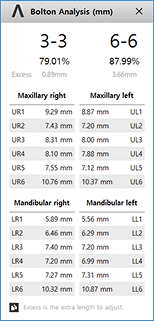
Bolton Ratio The Bolton Ratio values for 3-3 and 6-6 are displayed in real time, and the amount of IPR required to achieve the average ratio is automatically calculated.
OverJet / OverBite The OverJet / OverBite values before and after simulations, as well as the amount of change, are displayed in real time.
ALD (Arch Length Discrepancy) The ALD values for both upper and lower arches, along with the required and available space, are displayed in real time.
Arch Width The Arch Width values before and after simulation, as well as amount of change, are displayed in real time.
Freely Available
Available for design free, anytime, anywhere with dentOne:
- Anytime
- Anywhere
- Unlimited
Application
Consult with Patients Show tooth movement positions and processes in 3D. For example, easily explain the amount of space lacking in non-extraction cases and the amount of space remaining in extraction cases with numbers.
Transform Designs into Clear Aligners Designs can be converted into real clear aligner in seconds. Save in STL file format after breaking down the steps. You can either perform 3D printing yourself or place an order with us for production.
Pricing
Exporting a designed product to an STL file costs $1 per file, but everything else is free.
Product Information
| Manufacturer | DIORCO Co., Ltd |
|---|