
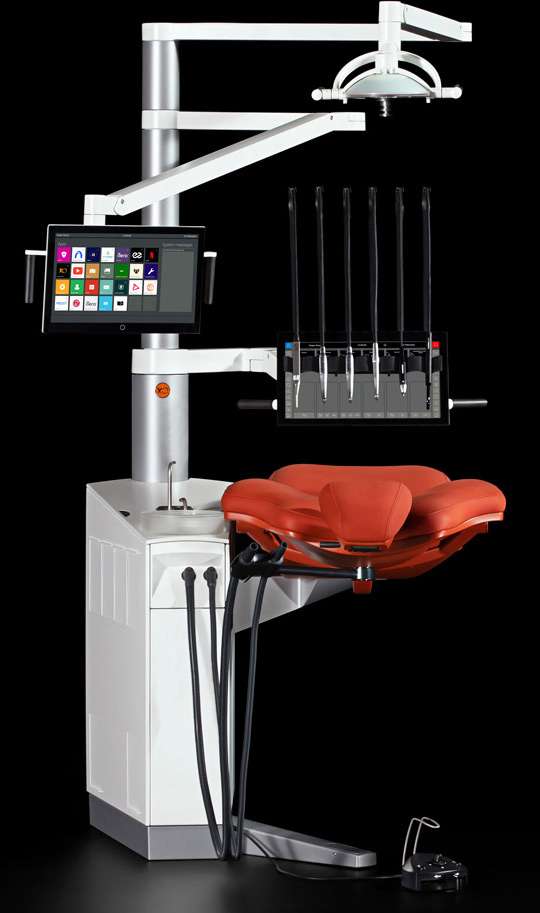
XO FLOW
XO CARE A/S · source
XO FLOW: The digital dental unit
Tailored to the individual dentist – upgradable when needed
In modern dentistry, no one size fits all. Dentists have individual needs, workflows, professional ambitions, expectations, and economic opportunities.
The digital dental treatment solution XO FLOW takes the dental team from entry-level to fully advanced workflow solutions. It meets the needs of the individual dentist and gives dental practices the flexibility to configure their dental treatment systems according to their evolving needs.
You can configure XO FLOW in a wide range, from a simple-to-use basic unit to a sophisticated treatment system for advanced dental care – and everything in between.
Select the solution you need today, with endless opportunities for future expansion and enhancement of the unit's functionality.
Standard Version
Use the highly intuitive Dashboard in the basic version of XO FLOW – a touch-activated graphical user interface, integrated into the instrument bridge – to monitor and control all functions of the unit and instruments – without losing sight of the patient.
XO FLOW is a unit for both newcomers and experienced users of XO units. As a newcomer, you get a unit that is intuitive and very easy to use due to the Dashboard with instructions. Experienced XO users, on the other hand, will still be able to control everything with the foot control as they are used to.
Advanced Version
Choose the advanced multi-user version of XO FLOW with procedure-specific instrument presets and a touch-activated screen – the Navigator – offering an intelligent user interface with XO dental apps.
Use instrument presets to select ideal settings for a specific procedure with just one click. XO dental apps are used for setting up and controlling the unit and for integrating with the practice's software applications by monitoring and managing e.g., intraoral scanners, practice management systems and web-based dental solutions directly from the unit.
Work Smarter with Dashboard
Using the Dashboard makes it easy to monitor and control all unit functions – without losing focus on the patient.
It is designed with a reinforced glass front, a thin protective steel frame and a self-adhesive protection foil.
Wearing gloves is no hindrance.
Configure the buttons to your own liking.
Always Ideal Instrument Settings
The more advanced version of XO FLOW enables working with instrument presets that allow you – with just one click – to select ideal instrument settings for a specific procedure.
You and your assistant will also be informed about the optimal choice of e.g. contra-angles and burs. Create your own presets or work with the default presets provided.
Manage All Clinic Software Directly From The Unit
When XO FLOW is fitted with a Navigator touch screen you can manage intraoral scanners, cameras, patient systems, and clinic software on the XO FLOW Navigator screen. Stream services like Netflix and YouTube, access your favorite websites and connect to remote computers/internet.
With everything gathered in the dental unit and displayed on the unit's Navigator screen, you avoid twists in the back because you no longer have to turn to look at the separate computer screen placed on a desk behind you, you save time from switching between various instrument software, you improve infection control procedures by removing the use of keyboard and mouse, and you keep focus on the patient during the entire treatment while improving the patient involvement as everything is displayed at the Navigator in front of the patient.
Three types of apps are available from the dental unit's Navigator screen:
- Unit apps for selecting a user, setting up the unit, guidance on ergonomics and infection control, sending emails, etc.
- Remote desktop apps for integrating with remote software applications such as intraoral scanners or patient management systems.
- Web apps for accessing web applications.
Red Dot Design Award-Winning Dental Unit
XO FLOW wins the categories "Medical Devices and Technology" and "Innovative Products."
Winner in the category "Medical Devices and Technology." The following statement was given by the jury: "With its intuitive touchscreen technology and floating elegance, XO FLOW enhances any dental practice and bridges the gap between functionality and comfort."
Winner in the category "Innovative Products." The following statement was given by the jury: "The digitalization of the dental treatment workspace implemented in XO FLOW substantially enhances and simplifies processes in dental practices."
Red Dot Winner 2021 in the category "Medical Devices and Technology" Red Dot Winner 2021 in the category "Innovative Products"
Incomparable Patient Experience
The patient has free access to the chair when the instrument bridge is in the parking position. Silent electric motors quickly place the patient in the working position.
When the instrument bridge is in the working position over the patient's chest, they neither see nor touches the instruments as they are shielded by the bridge. At the same time, the patient chair is extremely comfortable with ideal support for the patient's neck and arms.
Safety First
When XO FLOW is shut down, the unit's water lines are emptied, and the suction lines are automatically disinfected. At power-up, the water lines are automatically disinfected whereafter the unit is ready for use.
The unit has smooth surfaces that are easy and fast to clean and disinfect, and the handles and instrument holder etc. can be removed for cleaning and disinfection.
Sit, See and Work Well
The XO solution allows the operators to sit in an upright, balanced position, maintaining the natural curvature of the spine in the lumbar region. The light can be positioned so that the light beams are parallel to the direction of view, and the operators can see all surfaces of all teeth – while sitting well.
After use, the suction hoses automatically reposition in the suction hose holder as shown and hand instrument trays are used as configured.
Best Investment
As shown, XO FLOW improves productivity because the chairside assistant can easily prepare instruments and materials and exchange these with the dentist while handling the suction.
With the suction hose holder in the solo position, the dentist can reach the suction hoses and be his or her own assistant – and thereby save costs.
It is possible to place up to six instrument modules in any order and to exchange or add new modules later.
Software updates are offered free of charge, and XO FLOW is prepared for future needs and upgrades, new instrument modules and new features.
Informations produit
| Fabricant | XO CARE A/S |
|---|---|
| Dashboard | Touch-activated graphical user interface, integrated into the instrument bridge, with reinforced glass front, thin protective steel frame and self-adhesive protection foil |
| Navigator | Optional touch-activated screen for advanced version with intelligent user interface and XO dental apps |
| Ergonomics | Allows operators to sit in upright, balanced position maintaining natural spinal curvature |
| Design Award | Red Dot Design Award Winner 2021 in categories 'Medical Devices and Technology' and 'Innovative Products' |
| Configuration | Modular system with up to six instrument modules that can be placed in any order and exchanged or added later |
| Apps Available | Unit apps, Remote desktop apps, Web apps |
| Patient Access | Free access to chair when instrument bridge is in parking position |
| Electric Motors | Silent electric motors for quick patient positioning |
| Hand Instruments | Click-on instrument trays |
| Instrument Presets | Procedure-specific presets allowing ideal settings selection with one click |
| Suction Hose Holder | Automatic repositioning after use, available in solo position for dentist self-assistance |
| Water Line Disinfection | Automatic disinfection on shutdown and power-up |
| Suction Line Disinfection | Automatic disinfection on shutdown |